Software License Management: The Developer's Guide (Selling Licensed Software)
If you search "software license management," almost every result you find is written for IT teams — the people tracking what software their company buys. Compliance, seat reclamation, SaaS sprawl. All useful, but none of it is for you if you're on the other side: the developer who built the software and needs to control how customers access and use it.
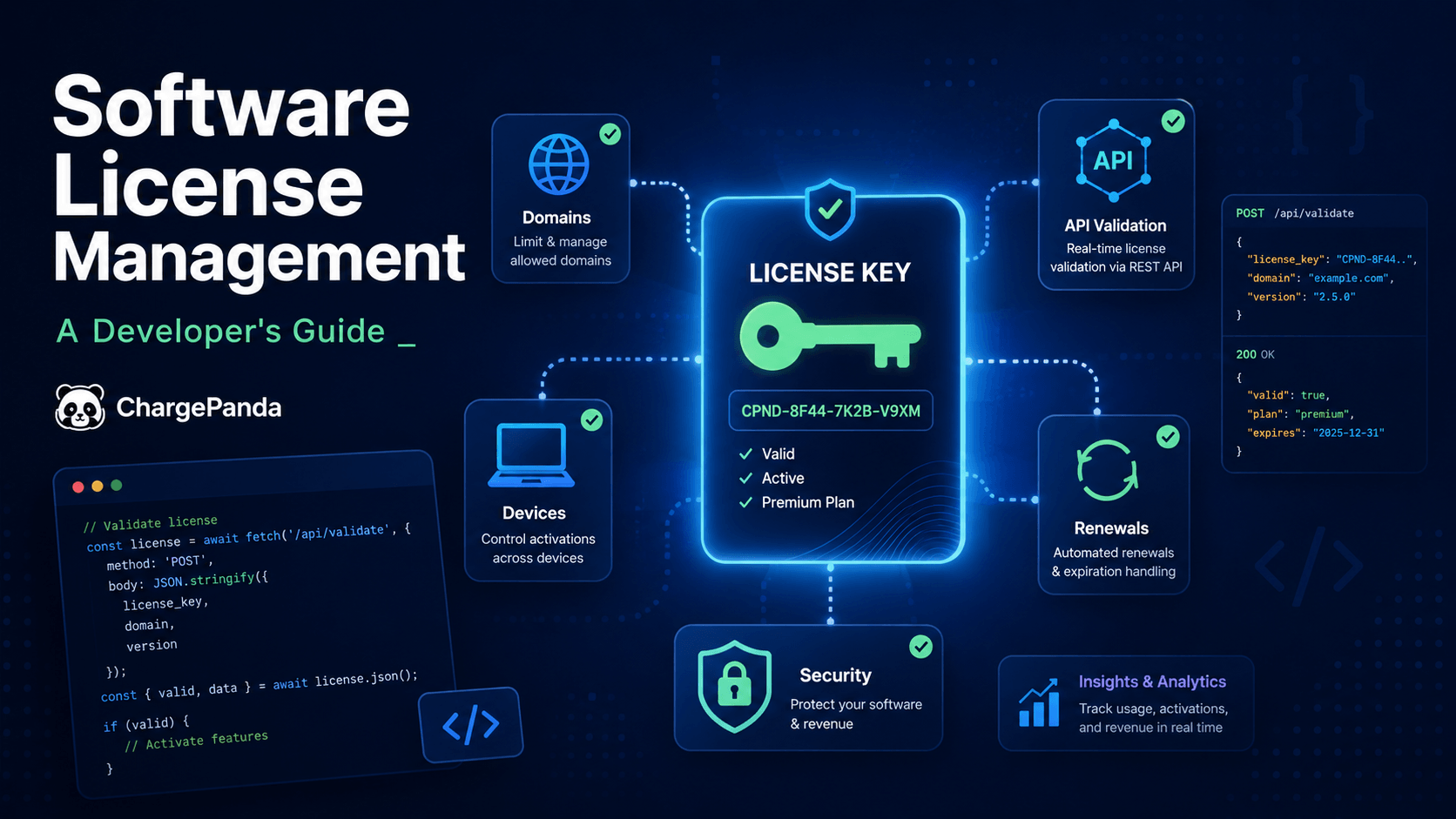
This guide is for that developer. Whether you're selling a WordPress plugin, a SaaS product, a script, or a downloadable tool, software license management means something different from your seat at the table. It means generating a unique key for every purchase, validating that key at runtime, limiting how many sites a single license can activate, and automatically enforcing renewals when a subscription lapses.
That's what we'll cover here — the mechanics, the best practices, and the decision between building your own system or using a platform that handles it for you.
What Is Software License Management?
Software license management (SLM) is the process of controlling how software licenses are issued, tracked, and enforced. But that definition means something entirely different depending on which side of the transaction you're on.
For enterprise IT teams and buyers, SLM means tracking the software their organization purchases: auditing compliance with vendor agreements, reclaiming unused seats, avoiding over-licensing, and staying prepared for a vendor audit. The goal is cost control and legal compliance.
For software producers — developers who sell plugins, themes, scripts, or SaaS products — software license management means controlling how their software is used. It covers generating secure license keys at purchase, validating them at runtime via API, enforcing activation limits across domains, and automating renewals when subscriptions expire.
Most articles on this topic are written for the first group. This one is written for the second.
Why Software License Management Matters for Developers
Without a license management system, most software businesses leak revenue in four specific ways.
License sharing. One customer buys a license. They install it on their own site, then share the key with a colleague, post it in a Slack group, or use it across five client sites they manage. You sold one license and have ten active installations. If you're a WordPress plugin developer with 500 paid licenses but 2,000+ active installs, the math is not in your favor.
No renewal revenue. If a license never expires, customers have no reason to renew. Annual license fees — which should be a consistent revenue stream — turn into one-time purchases. A developer who sells 200 new licenses per year but has zero renewal revenue is starting from scratch every January.
No usage visibility. Without activation tracking, you have no record of which customers are currently active, what domains they're running your software on, or who stopped using it six months ago. You're flying blind on churn, which makes support prioritization and product decisions significantly harder.
Support abuse. Customers running unauthorized copies or expired licenses still file tickets. They consume your support time for access they didn't pay for. Without an audit trail of license activations, you have no way to verify a customer's status before responding.
A license management system closes all four of these gaps. Here's how the pieces fit together.
The Four Types of Software Licenses (And Which One to Use)
Before you implement a license management system, you need to decide what model you're selling under. There are four primary options, each with different revenue implications and enforcement complexity.
Perpetual license. The customer pays once and owns the software indefinitely. Simple to sell and understand, but it generates no recurring revenue. Works well for one-time tools, templates, and scripts where the expectation is "buy it and it's yours."
Annual (subscription) license. The customer pays yearly; the license expires and must be renewed to continue receiving updates and support. This is the most common model for commercial WordPress plugins and SaaS tools. It creates predictable recurring revenue, but it requires expiry enforcement — if your software doesn't stop working at renewal time, customers have no incentive to pay.
Lifetime license. A one-time payment at a premium price. The customer owns the software indefinitely, but you can define a support window — "lifetime access to updates for 3 years, then continued use without updates." ChargePanda uses this model for its own pricing, because it converts well against monthly-subscription fatigue while still being profitable.
Per-seat / usage-based license. Charged per user, per installation, or per volume of usage. Common in enterprise SaaS. Highest revenue ceiling but the most complex to enforce — you need metering infrastructure in addition to activation tracking.
| License Model | Payment | Renewal Revenue | Enforcement Complexity | Best For |
|---|---|---|---|---|
| Perpetual | One-time | None | Low | Templates, scripts, simple tools |
| Annual | Recurring | High | Medium | Plugins, themes, tools with updates |
| Lifetime | One-time (premium) | None | Low | Creator tools, indie SaaS |
| Per-seat | Recurring | High | High | Enterprise SaaS, team software |
Pick the model before you build. The enforcement mechanics differ enough that retrofitting a perpetual license system for subscriptions later is painful.
How Software License Management Works: The Technical Layer
Once you've chosen a licensing model, you need infrastructure to enforce it. Here's how each component works.
License Key Generation
A license key is a unique string tied to a specific purchase. When a customer completes checkout, your system generates a key and delivers it — via email or a customer portal — that the customer uses to activate their copy of the software.
The difference between a secure key and an insecure one is how it's generated. A simple serial number (XXXX-XXXX-XXXX-XXXX) with no cryptographic backing is trivially guessable or brute-forceable. A properly generated key is HMAC-signed or cryptographically derived from purchase metadata — product ID, customer ID, expiry date — so that any modification to the key invalidates it. The software can verify the key's signature without phoning home on every page load.
For most developers selling commercial software, the practical takeaway is: use a purpose-built license server that handles key generation correctly rather than rolling your own. The failure modes of homegrown key generation (key collisions, predictable patterns, no expiry encoding) are subtle and expensive to discover in production.
Activation Limits and Domain/IP Binding
An activation is what happens when a customer installs your software and registers it against their license key. The license server records: which license key, which domain, and when.
Activation limits cap how many times a single license can be installed. A license with a limit of 3 means the customer can run your software on up to three domains — their dev, staging, and production environments, for example. On the fourth attempt, the activation is declined.
Domain binding goes further: the license is tied to a specific list of approved domains. Even if a customer has activations remaining, they can only use them on approved-domain.com, not on an unauthorized site. This is the primary defense against license sharing — a key posted in a forum doesn't work unless the person posting it also transfers the activation to the new domain.
IP binding works the same way for server-side software. Combined with activation limits, domain binding gives you meaningful control without creating friction for legitimate customers.
When a customer's activation limit is reached, your software should communicate this clearly — "License limit reached. Visit [portal URL] to manage your activations." Make self-service deactivation available. A customer who can release an activation themselves (when moving from dev to production, for example) will never file a ticket about it.
REST API Validation
The license server and your software communicate through a REST API. When a customer installs your plugin or application, the software calls the validation endpoint with the license key and domain. The server responds with whether the license is valid, how many activations remain, and when it expires.
Here's what that request and response look like in practice:
POST /api/validate-license

{
  "license_key": "XXXX-XXXX-XXXX-XXXX",
  "domain": "yourclient.com",
  "product_slug": "my-plugin"
}

// Response
{
  "valid": true,
  "activations_remaining": 3,
  "expires_at": "2026-12-31"
}
Your software checks valid on activation and, optionally, on a periodic schedule (once a day, once a week — not on every page load). If the license is expired or invalid, the software degrades gracefully: it stops applying updates, shows a renewal notice, or limits functionality depending on how you've configured it.
The REST API is also how you handle edge cases: deactivations when a customer migrates to a new server, reactivations after a renewal payment, and hard blocks when a license is revoked.
Renewal and Expiry Enforcement
When an annual license expires, you have a spectrum of options for what happens next. At the lenient end: the software keeps working but stops receiving updates. At the strict end: the software stops working until the license is renewed.
The most conversion-friendly model is the "support window" approach: after expiry, the software continues to function at its current version, but the customer can no longer download updates or access support. This removes the fear of "what if I forget to renew and my site breaks" while still giving customers a strong incentive to renew — they want the latest version and security patches.
Send automated renewal reminders at 90, 60, and 30 days before expiry. An email sent 30 days before a license lapses converts far better than one sent the day after it already expired.
Software License Management Best Practices for Developers
Six practices worth establishing before you go live.
Never store license keys in plaintext. Hash or encrypt keys in your database. One compromised database shouldn't expose every customer license you've ever issued. This also means you can't "look up" a customer's key for them — but that's by design. Your customer portal should allow key regeneration, not key retrieval.
Implement graceful degradation, not hard failure. When a license check fails due to a network error or your license server being temporarily unavailable, don't take your customer's site down. Fail open with a short retry window (24–48 hours) before applying restrictions. Your uptime problem should never become your customer's production problem.
Log every activation event. Customer ID, domain, IP, timestamp, license key. This is your audit trail for every support conversation that starts with "I only installed it once." Logs don't lie; customer recollections do.
Keep your license server separate from your product. Don't bundle validation logic into the plugin itself — a determined user can decompile it. A separate license server means validation happens server-side, where it can't be tampered with, and the decryption keys are never in the customer's hands.
Send renewal reminders on a 90/60/30-day cadence. Most customers don't fail to renew because they don't want to — they fail because they forgot. Automated reminders with a direct renewal link eliminate most of that friction. The 90-day email is for visibility; the 30-day email is what actually drives clicks.
Make deactivation self-service. A customer who can release an activation through a portal — when migrating from staging to production, or consolidating from three sites to two — will do it themselves at 2 a.m. instead of filing a ticket at 9 a.m. Every self-service deactivation is a support ticket that didn't happen.
Build vs. Buy: License Management System Options for Indie Developers
What is a license management system, practically speaking? It's a combination of a key generator, an activation database, a REST validation API, a customer portal, and a renewal/notification system. You can assemble these yourself, buy an enterprise platform, or use a purpose-built tool for indie developers.
Build Your Own
A custom license server is the right call if you have highly specific requirements — unusual licensing models, deep integration with existing infrastructure, or a platform that will eventually license thousands of products.
Realistic scope for a basic system: 40–80 hours of development for key generation, validation endpoints, an admin UI, and renewal email integration. Ongoing maintenance is non-trivial. You'll need to handle key revocation, edge cases in validation, customer portal updates, and security patches to your own infrastructure. For most indie developers, this is engineering time that's better spent on the product.
Enterprise License Management Platforms
Flexera (Revenera), OpenLM, and similar platforms are built for large ISVs licensing complex enterprise software to large corporate customers. They handle sophisticated scenarios: floating licenses, concurrent usage across networks, compliance audit reporting. Pricing typically starts at $50,000+/year. Not the right fit for a developer selling a WordPress plugin or a $49 script.
Self-Hosted Platforms for Indie Developers
The most practical option for the vast majority of developers selling commercial software: a purpose-built platform that handles all the license management infrastructure, leaves you in control of your own server, and charges you once rather than taking a cut of every sale.
ChargePanda sits in this category — a self-hosted PHP/Laravel script ($49 one-time) that provides built-in license key generation, REST validation API, activation limits, domain binding, subscription billing, and a customer portal. You run it on your own server. No transaction fees. No monthly platform subscription.
Here's how the options compare:
| Platform | Hosting | Transaction Fee | License Management | Price |
|---|---|---|---|---|
| ChargePanda | Self-hosted | 0% | Built-in (keys, REST API, activation limits) | $49 one-time |
| Gumroad | Cloud/SaaS | Up to 10% | None | Free + % |
| Lemon Squeezy | Cloud/SaaS | 2–8% | Basic | Monthly fee |
| Paddle | Cloud/SaaS | 5% | None | % of revenue |
| Custom-built | Self-hosted | 0% | DIY | Dev time |
At $10,000/month in plugin sales, Gumroad's 10% fee costs $1,000 per month — $12,000 per year. ChargePanda costs $49 once. The license management features that Gumroad doesn't have at all are included. The comparison isn't subtle.
Setting Up Software License Management with ChargePanda
Everything described in this article — key generation, activation limits, REST validation, renewal billing — is available in ChargePanda out of the box. Here's the rough shape of a setup:
Add your product in the ChargePanda admin panel and enable license key generation. Set the key format, activation limit (e.g., 3 domains per license), and expiry rules (annual, lifetime, or custom).
Configure your billing plans — one-time, annual, or both. ChargePanda generates a unique license key automatically when a customer completes checkout and delivers it via email.
Copy the REST validation endpoint from your ChargePanda installation. This is the URL your plugin or script will call to validate a license at activation time.
Integrate the validation call into your product — typically in the activation hook for a WordPress plugin, or on app boot for a standalone script. The request is a POST with the license key and domain; the response tells you whether to proceed, how many activations remain, and when the license expires.
Customers manage their own activations through a self-service portal — releasing activations when they migrate servers, viewing their license status, and completing renewals directly.
The full setup — from installation to first validated license — typically takes an afternoon. If you're an Envato author, ChargePanda's Envato Integration module connects directly to the Envato API to verify purchase codes and issue license keys to your existing CodeCanyon/ThemeForest buyers automatically.
You can walk through a live demo at chargepanda.com/demo.
Frequently Asked Questions
What is the role of a software license manager?
For a developer selling software, a license manager is the system responsible for: issuing unique keys at purchase, validating them when a customer activates your software, enforcing the limit on how many installations a single license covers, sending renewal reminders before expiry, and maintaining an audit trail of every activation. In practice, it's either a custom-built server or a platform like ChargePanda that handles these functions so you don't have to build them yourself.
How do I manage software licensing as my product scales?
Start simple: one license tier, a flat activation limit (3–5 per license), and automated key delivery on purchase. Once you have revenue, layer in tiered licensing — Personal, Professional, Agency — with different activation limits and pricing. Add a customer self-service portal so buyers can manage their own activations without contacting support. At significant scale (hundreds of active licenses), invest in usage analytics so you can identify which tiers customers are actually using and price accordingly.
What is software license management for open-source projects?
Open-source licenses (MIT, GPL, Apache, LGPL) govern what others can do with your source code — whether they can modify it, redistribute it, or use it in proprietary projects. That's a different topic from what this article covers. If you're monetizing an open-source project, a dual-license model is common: free under GPL for open-source use, paid commercial license for proprietary use. The commercial license is what you'd manage with a system like the one described here.
Start Selling Licensed Software Today
Every developer who's shipped commercial software has eventually confronted the same problem: someone found a way to use it without paying, or paying customers used it beyond the terms they agreed to, or there was no system at all and revenue was less predictable than it should have been.
License management is the infrastructure layer that closes those gaps — not as a punitive lockdown, but as the basic business machinery that makes recurring revenue, controlled distribution, and customer accountability possible.
If you're ready to add that layer to what you're building, ChargePanda is the most direct path to get there: self-hosted on your server, $49 one-time, with license key generation, REST validation, activation limits, and subscription billing included from day one. Zero transaction fees, ever.
ChargePanda Support
ChargePanda Support is the editorial team at ChargePanda — a self-hosted platform helping developers and digital product sellers manage licensing, file delivery, subscriptions and support from one place.