Own Your Envato Customers.
Sell Everywhere.
Envato just dropped exclusivity. From July 2026 you're free to sell your CodeCanyon and ThemeForest items anywhere — including your own site. Envato Integration verifies purchase codes via the official Envato API, auto-issues license keys, and brings every buyer into your ChargePanda store so you own the customer relationship and keep 100% of direct-sale revenue.
Buy Chargepanda today → get this FREE
New customers who purchase ChargePanda unlock this module at no cost.
Existing customers → 30% off
Already own ChargePanda? Your loyalty discount is applied automatically.
New customers: offer valid only when ChargePanda is purchased first. Existing customers: discount applied to this module only.
One-time price
What's included
Envato Integration Module
- Envato Integration Module
Optional add-ons
Professional Installation & Setup (optional)
The biggest change in Envato's history is your biggest opportunity
For the first time, Envato authors can sell their items everywhere — no more exclusivity lock-in. Here's what that means and why you need to act now.
Locked to the marketplace
Exclusive authors could only sell on Envato Market — no personal website, no other platform. In exchange they received a higher revenue share tier. Non-exclusive authors paid 55% to Envato.
One flat model, sell anywhere
Envato removes the exclusive/non-exclusive distinction. All authors move to a single flat 50% revenue share, and the exclusivity requirement is gone entirely — you are free to sell on your own site, on other platforms, everywhere.
Sell direct, keep 100%
Marketplace sale: you keep 50%. Direct sale through your own ChargePanda store: you keep 100%. Plus you own the customer email, the license, the renewal — the entire relationship. Envato Integration bridges your existing buyers and powers your new direct channel.
Every direct sale is worth twice a marketplace sale
If your plugin sells for $59, an Envato marketplace sale nets you ~$29.50 after their 50% cut. The same plugin sold direct through ChargePanda nets you $59. Envato Integration is the infrastructure that makes your direct channel work — from verifying existing buyers' purchase codes to issuing new licenses on direct purchases.
Envato gives buyers a code. This module turns it into a customer.
When someone buys your item on Envato Market, all they receive is a purchase code — a UUID that proves the sale. Envato doesn't give you their email, no license key, no account in your system. They're a transaction, not a relationship.
Envato Integration changes that. The buyer pastes their purchase code (or signs in with Envato), the module hits the official Envato API to verify the sale is genuine and unmodified, then instantly mints a completed order + a license key inside your ChargePanda store — tied to their account, with expiry and activation limits you control.
Buyer purchases on Envato Market
Envato emails them a purchase code (UUID). That's the only proof-of-purchase they have.
Buyer claims in your ChargePanda store
They log in and paste the code (or sign in with Envato). The module calls the Envato API to verify the sale in real time.
Order + license key minted instantly
A completed order is created with the Envato sale amount recorded. A license key is issued (where the plan is licensable) with your chosen expiry and activation limit. The purchase code is locked — can never be claimed again.
You now own the customer
They have an account in your store. You have their email, their license, and the ability to upsell, renew, and communicate — permanently, independent of Envato.
The old verification code left you blind.
This one builds your audience.
Most Envato authors bolt on a purchase-code verification snippet. It calls Envato's API, returns valid or invalid, and that's the end of it — you never learn who just bought from you.
Blind verification
-
Pings Envato's servers, gets
validorinvalid— nothing else - No email captured — you have no idea who just claimed
- No account created in your system
- Buyer remains entirely Envato's customer
- Zero mailing list growth from your own sales
- No path to upsell, renew, or re-engage
Your own license server
- Claim runs through your ChargePanda store — your server
- Email captured — buyer creates an account to claim
- Order + license key recorded against their account
- Buyer is now your customer — fully independent of Envato
- Mailing list grows with every single claim
- Full path to email campaigns, upsells, renewals, new product launches
Every license claim = a verified email on your list
Revenue from a sale ends when the transaction clears. Revenue from an email list compounds — every new product launch, update announcement, or upsell campaign reaches an audience that already trusts you because they bought from you.
An owned audience is an asset Envato can never take away — no matter what they change about their marketplace, revenue share, or terms. You're not buying a verification product. You're buying a customer-acquisition engine that builds your business with every single claim.
Every buyer pathway covered — from power user to first-timer
All three flows require a logged-in account, preventing duplicate claims. Each is independently togglable in Admin → Envato Integration.
Manual Purchase-Code Claim
Claim 1Account → Envato Licenses
Your buyer logs into your store, goes to Account → Envato Licenses, pastes their UUID purchase code, and hits Claim. The module verifies it against the Envato API in real time. On success: order created, license issued, code locked. The same page lists all their previously claimed licenses with keys, expiry dates, and activation status.
Sign in with Envato (OAuth)
Claim 2 OptionalLogin / Register pages
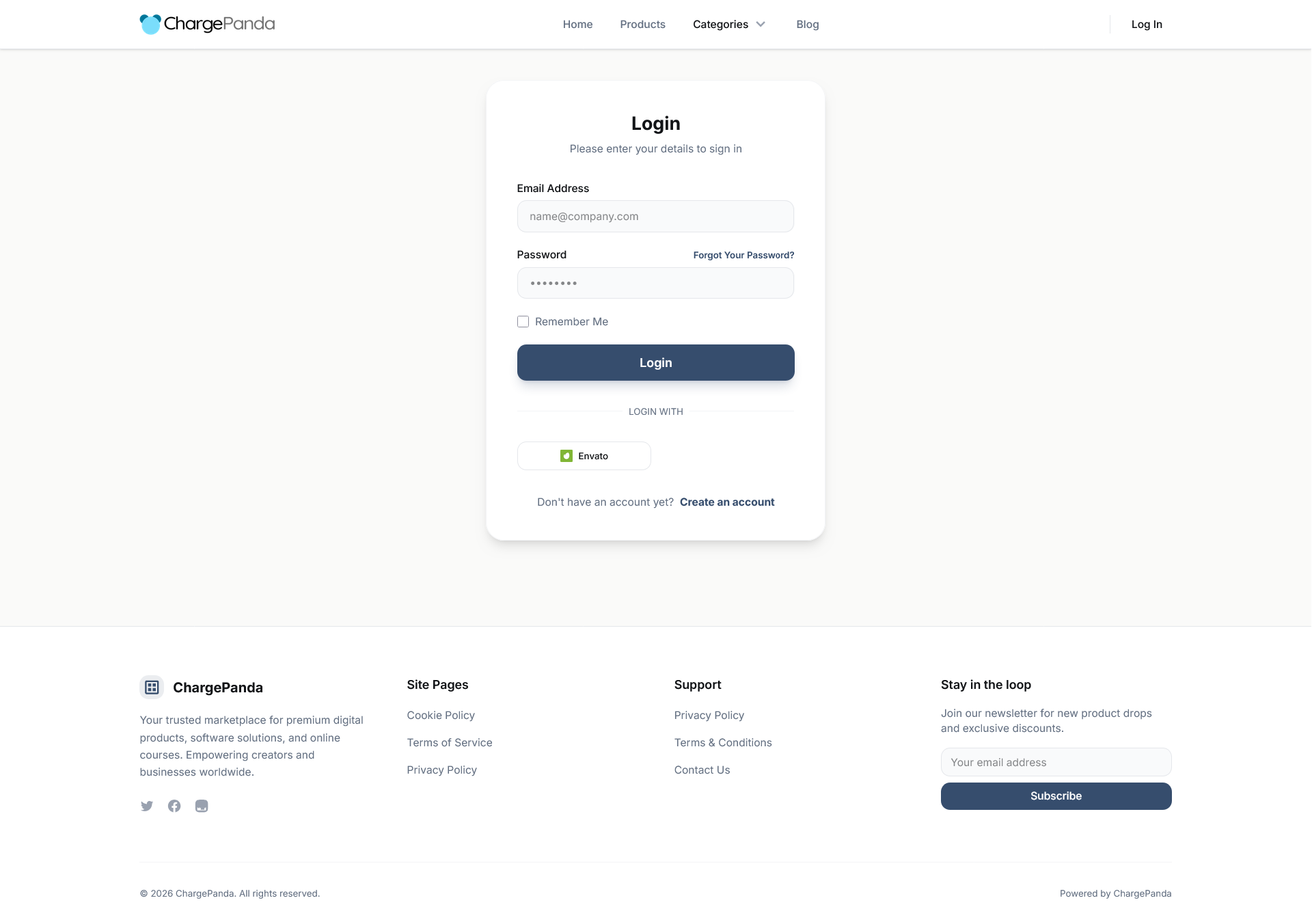
Add a "Sign in with Envato" button to your login and registration pages via ChargePanda's existing Social Logins infrastructure. Buyers authenticate with their Envato account — no purchase code entry needed. Requires an Envato OAuth app (15 minutes to create; the admin settings page shows the exact redirect URI and required permissions).
Auto-Claim on OAuth Login
Claim 3 Most PowerfulRequires OAuth + list-purchases permission
The most hands-off flow for your buyers. When enabled, the moment a buyer signs in with Envato, the module fetches their entire Envato purchase history and automatically issues licenses for every mapped item they own — no code entry at all. One login click, all their licenses in their account. Individual failures (unmapped items, already-claimed codes) are silently skipped so one bad code never aborts the batch.
Map any Envato item to any product — with full control over licensing terms
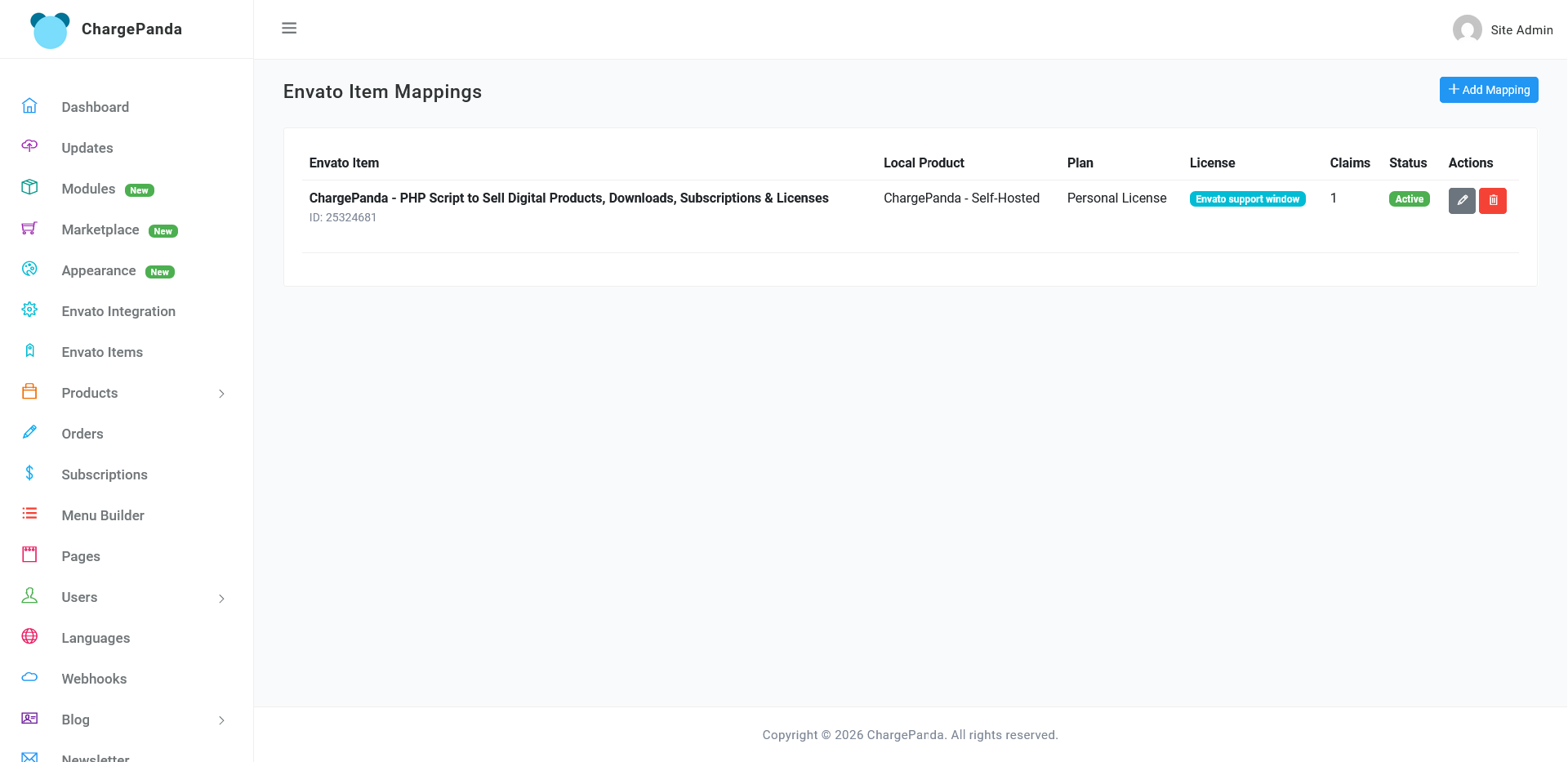
Admin → Envato Items gives you a full CRUD item-mapping interface. Connect any Envato item (CodeCanyon or ThemeForest) to a local ChargePanda product and plan. No limit on the number of mappings — all items, all products, all plans.
Envato Item ID → Product + Plan
Paste the item's numeric ID from its Envato URL. Pick your local product and (optionally) the specific plan. Multi-plan products show a cascading plan dropdown.
License duration — three modes
Lifetime — never expires. Fixed duration — days/weeks/months/years, set per item. Sync to Envato support window — expiry inherits the supported_until date from the sale record, updating your license model to match Envato support periods automatically.
Max activations — per-item override
Set the maximum number of domains/devices per license. Leave blank for unlimited. Overrides the plan default for Envato-claimed licenses.
Active / Disabled status per mapping
Need to sunset an old item or pause claims for a specific product? Flip the mapping to Disabled without deleting it. Existing claims are unaffected.
All flows default to off after installation — you opt in to only the flows you want.
From install to first live claim in under 5 minutes
Install the module
Upload the ZIP in Admin → Modules and click Activate. The installer creates the three database tables (envato_item_mappings, envato_claims, envato_username on users) and seeds all settings as disabled — opt-in by design.
Paste your Envato token and map items
Go to Admin → Envato Integration, paste your Envato Personal Token (generate one in your Envato account — needs "View your items' sales history" scope). Then open Admin → Envato Items and create a mapping for each item: Envato Item ID → your local product, choose license terms.
Enable claim flows and go live
Toggle on whichever claim flows you want — account portal, OAuth login, auto-claim — individually. If you want OAuth/auto-claim, configure your Envato app via Admin → Social Logins (redirect URI shown in settings). Your buyers can claim immediately.
No queue worker. No webhooks. No cron job.
Unlike some integrations that require polling, webhooks, or background workers, Envato Integration is entirely request-driven. Verification happens synchronously at claim time via the Envato API (15s timeout, configurable). No additional server configuration required beyond the module itself.
- ChargePanda v1.3.0+
- Envato Personal Token (required)
- Outbound HTTPS to
api.envato.com - ○Envato OAuth app (optional — only for OAuth/auto-claim)
Everything in the box
| Feature | Included | Notes |
|---|---|---|
| Purchase-code verification via official Envato API | ✓ Yes | Real-time call to /v3/market/author/sale; 15s timeout (configurable) |
| One-time-claim fraud guard | ✓ Yes | Each purchase code permanently locked after first successful claim |
| Automatic completed order creation | ✓ Yes | payment_method = 'envato'; Envato sale amount recorded as order total |
| Automatic license key generation | ✓ Yes | Only issued when the mapped plan has is_licensable = true |
| Customer Envato Licenses portal | ✓ Yes | Account section: claim page + full history with keys, expiry, revoked status |
| Sign in with Envato (OAuth button) | ✓ Yes | Optional; via ChargePanda Social Logins; needs Envato OAuth app |
| Auto-claim full purchase history on OAuth login | ✓ Yes | Optional; requires list-purchases OAuth scope; fault-tolerant batch |
| Unlimited item mappings | ✓ Yes | Any Envato Item ID → any one-time product + plan |
| License expiry synced to Envato support window | ✓ Yes | Per-mapping toggle; inherits supported_until from sale record |
| Lifetime / fixed-duration license options | ✓ Yes | Falls back to plan validity when support-window sync is off |
| Per-mapping max-activation override | ✓ Yes | Blank = unlimited; overrides plan default for Envato claims |
| Active / Disabled status per mapping | ✓ Yes | Pause claims per item without deleting history |
| Envato username linked to customer account | ✓ Yes | Stored on users table via auto-migration |
| Three developer events (hooks) | ✓ Yes | EnvatoPurchaseVerified, EnvatoItemMappingResolving, EnvatoLicenseClaimed |
| Auto-migrations on activation | ✓ Yes | 3 DB changes; runs automatically — no manual migration needed |
| All flows opt-in (default off) | ✓ Yes | Nothing is exposed to customers until you deliberately enable it |
Hook into every step of the claim lifecycle
Three public Laravel events fire at key moments in the claim pipeline. Use them to send custom emails, grant entitlements in other modules, override which mapping is resolved, or build any other business logic — without modifying the module itself.
Subscribe via standard Laravel event listeners in your EventServiceProvider. All events are documented with payload structure and code samples in the module docs.
EnvatoPurchaseVerified
Fires immediately after the Envato API confirms the purchase code is genuine — before any mapping, order, or license is created. Carries the full normalized sale payload (item ID, buyer username, amount, currency, supported-until date).
Use for: custom logging, external CRM sync, pre-claim notifications
EnvatoItemMappingResolving
Fires when the module is about to look up which item mapping to use. A listener can override the resolved mapping — useful for dynamic routing by Envato license type, buyer location, or custom business rules.
Use for: custom mapping logic, A/B product routing, license-type-based plans
EnvatoLicenseClaimed
Fires after the order, license, and claim records are all persisted. The most commonly used event. Carries the order, license (if issued), claim record, and user. Use it to trigger post-claim actions.
Use for: welcome emails, entitlement grants, Slack notifications, webhooks
Minimal — if you're running ChargePanda, you're almost there
The stack is intentionally lean. No external queue worker, no webhook configuration, no third-party SaaS account required beyond an Envato Personal Token (free to generate).
The Envato OAuth app is only needed if you want the "Sign in with Envato" button or auto-claim. The admin settings page walks you through creating it with the exact redirect URI and permission scopes pre-filled.
- ChargePanda core ^1.3.0
-
Envato Personal Token — required
Generate in your Envato account → API Keys. Needs "View your items' sales history" scope.
-
Outbound HTTPS to
api.envato.com -
○
Envato OAuth App — optional
Only needed for "Sign in with Envato" and auto-claim. Requires username, email, profile, view sites, and list-purchases scopes.
Frequently asked questions
Does this work with the July 2026 Envato exclusivity changes? +
Yes — that is the core use case. From 1 July 2026 Envato ends exclusive author accounts and moves all marketplace sellers to a flat 50% revenue share, freeing everyone to sell anywhere. Envato Integration lets you bridge your existing Envato buyers into your own store (where you keep 100%), sell direct going forward, and own every customer relationship — all without abandoning Envato as a distribution channel.
Do buyers need to be logged in to claim a purchase code? +
Yes. All three claim flows — manual code entry, Sign in with Envato, and auto-claim — require the buyer to be authenticated in your ChargePanda store. This is by design: it ties every claim to a real customer account, enables the license and order to be attributed correctly, and prevents anonymous or duplicate claims.
Can the same purchase code be claimed twice? +
No. Each successful claim creates an EnvatoClaim record that permanently locks the purchase code. Any subsequent attempt to claim the same code — by the same or a different user — is rejected with a clear error. This mirrors Envato's own one-purchase-per-code model.
Do I still need to be an Envato author to use this module? +
Yes — the module verifies purchase codes against your items' sales history via your Envato Personal Token. You need to have items listed on Envato Market for there to be any sales to verify. The module doesn't care whether you're exclusive or non-exclusive — both work identically after July 2026's changes.
Can license expiry follow the Envato support window? +
Yes. Each item mapping has an optional "Expire when Envato support window ends" toggle. When on, the issued license inherits the supported_until field from Envato's sale record — so buyers who purchased extended support get a longer license, and standard buyers get the standard period. This takes precedence over the plan's own validity settings.
Is a license key always issued when a purchase code is claimed? +
A license key is issued only when the mapped plan has is_licensable = true in ChargePanda. If the plan is not licensable, a completed order is still created with the Envato sale amount recorded, but no key is generated. The admin item-mapping form shows a live warning if the selected plan has no licensable tier.
Is there a revenue share or per-claim fee? +
No. Envato Integration is a one-time module purchase. ChargePanda charges no cut of your direct-sale or claim revenue — ever. Your only ongoing costs are your ChargePanda license and your own hosting. This is the whole point of direct sales: you keep everything.
How is this different from a standard Envato purchase-code verification script? +
A standard verification snippet calls Envato's API and returns valid or invalid — that's it. You learn nothing: no email, no name, no account. The buyer remains Envato's customer and you have no way to reach them again. Envato Integration is fundamentally different: the claim runs through your own ChargePanda store, so the buyer must create an account to claim. You capture their email, a real order is recorded, and a license key is issued. You turn an anonymous Envato transaction into a customer you own — one you can email about product updates, new launches, and upgrades for years to come. That compounding email list is the long-term revenue engine a verification script can never build.
Own your Envato customers before everyone else does
Every day you delay is another Envato buyer who never becomes a customer in your store. Envato Integration converts purchase codes into real orders, real licenses, and real customer relationships — with a 5-minute setup.